24. WorkManager
24.1. What is a WorkManager
WorkManager is a library used to enqueue deferrable work that is guaranteed to execute sometime after its Constraints are met. WorkManager allows observation of work status and the ability to create complex chains of work.
24.2. Why is a WorkManager
- To optimise the battery consumption.
- To maintain the background work correctly without affecting the processing speed
- Deferrable and Guaranteed background work.
- To get rid of the boilerplate code.
- Backwards Compatible up to API 14
- Uses JobScheduler on devices with API 23+
- Uses a combination of BroadcastReceiver + AlarmManager on devices with API 14 - 22
24.3. Components of WorkManager
- Below image represents all the three components of WorkManager :
- Worker: The main class where we will put the work that needs to be done.
- WorkRequest: It defines an individual task, like it will define which worker class should execute the task.
- WorkManager: The class used to enqueue the work requests.
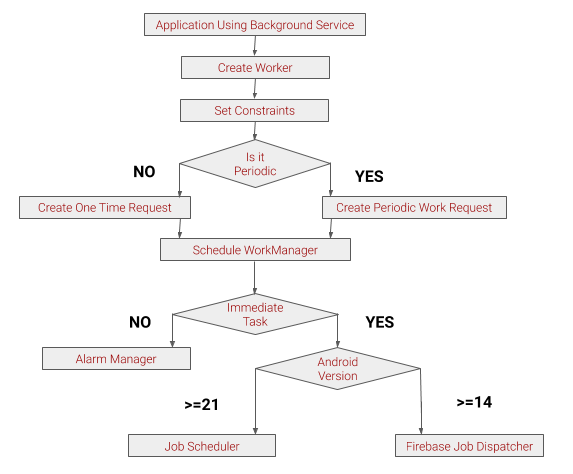
24.4. Scheduling WorkManager
- Below Graph represents the flow of WorkManager : Access the image here

24.5. How is WorkManager
- Add Dependency to the BuildGradle(app) to import Workmanager libraries
implementation ‘androidx.work:work-runtime:2.3.4’
- Change the JVM version of the android studio by adding this in BuildGradle(app)
compileOptions {
sourceCompatibility JavaVersion.VERSION_1_8
 		targetCompatibility JavaVersion.VERSION_1_8
}
24.6. Coding Process for WorkManager
24.6.1. Create a Worker Class
- Create a class by extending it to the Worker class.
- Then method has to be implemented to handle the work and return work status.
public class FirstWork extends Worker {
    public FirstWork(@NonNull Context context, @NonNull WorkerParameters workerParams) {
        super(context, workerParams);
    }
    @NonNull
    @Override
    public Result doWork() {
        Log.i("First","This is my work");
        return Result.success();
    }
}
24.6.2. Calling Worker Class
- Worker class will be Declared , Instantiated.
- Worker class will triggered by clicking or handling any action.
OneTimeWorkRequest firstrequest;
PeriodicWorkRequest secondwork
/* For one time work request */
firstrequest = new OneTimeWorkRequest.Builder(FirstWork.class).build();
/* For periodic work request */
secondRequest = new PeriodicWorkRequest.Builder(SecondWork.class,15,TimeUnit.MINUTES).build();
/* WorkManager to trigger the work */
 WorkManager.getInstance(this).enqueue(firstrequest);
 WorkManager.getInstance(this).enqueue(secondwork);
24.6.3. Adding Constraints
- We can add constraints to the worker class ,by which the work will be initiated on after the Constraints are met.
Constraints c = new Constraints.Builder().setRequiredNetworkType(NetworkType.CONNECTED).build();
firstrequest = new OneTimeWorkRequest.Builder(FirstWork.class).setConstraints(c).build();
24.6.4. Passing Data
- We can pass the data to the Worker class from the main class.
- Send :
data = Data.Builder().putString("Name","MYWork Notification").build();
firstrequest = new OneTimeWorkRequest.Builder(FirstWork.class).setConstraints(c)..setInputData(data).build();
- Recieve :
String name = inputData.getString("Name").toString()