40. Android App with WebView
- The WebView class is an extension of Android’s View class that allows you to display web pages as a part of your activity layout. It does not include any features of a fully developed web browser, such as navigation controls or an address bar. All that WebView does, by default, is show a web page.
- A common scenario in which using WebView is helpful is when you want to provide information in your app that you might need to update, such as an end-user agreement or a user guide. Within your Android app, you can create an Activity that contains a WebView, then use that to display your document that’s hosted online.
- Another scenario in which WebView can help is if your app provides data to the user that always requires an Internet connection to retrieve data, such as email. In this case, you might find that it’s easier to build a WebView in your Android app that shows a web page with all the user data, rather than performing a network request, then parsing the data and rendering it in an Android layout. Instead, you can design a web page that’s tailored for Android devices and then implement a WebView in your Android app that loads the web page
40.1. Adding a WebView to your app
- To add a WebView to your app, you can either include the
element in your activity layout, or set the entire Activity window as a WebView in onCreate().
To add a WebViewto your app in the layout, add the following code to your activity’s layout XML file:
<WebView
    android:id="@+id/webview"
    android:layout_width="match_parent"
    android:layout_height="match_parent"
/>
40.1.1. To load a web page in the WebView, use loadUrl(). For example:
WebView myWebView = (WebView) findViewById(R.id.webview);
myWebView.loadUrl("http://www.example.com");
Before this works, however, your app must have access to the Internet. To get internet access, request the INTERNET permission in your manifest file.
- For example:
<manifest ... >
      <uses-permission android:name="android.permission.INTERNET" />
        ...
 </manifest>
40.1.2. That’s all you need for a basic WebView that displays a web page. Additionally, you can customize your WebViewby modifying the following:
- Enabling fullscreen support with WebChromeClient. This class is also called when a WebView needs permission to alter the host app’s UI, such as creating or closing windows and sending JavaScript dialogs to the user. To learn more about debugging in this context, read Debugging Web Apps.
- Handling events that impact content rendering, such as errors on form submissions or navigation with WebViewClient. You can also use this subclass to intercept URL loading.
- Enabling JavaScript by modifying WebSettings.
- Using JavaScript to access Android framework objects that you have injected into a WebView.
40.2. Using JavaScript in WebView
- If the web page you plan to load in your WebView uses JavaScript, you must enable JavaScript for your WebView. Once JavaScript is enabled, you can also create interfaces between your app code and your JavaScript code.
40.2.1. Enabling JavaScript
- JavaScript is disabled in a WebView by default. You can enable it through the WebSettings attached to your WebView.You can retrieve WebSettings with getSettings(), then enable JavaScript with setJavaScriptEnabled().
WebView myWebView = (WebView) findViewById(R.id.webview);
WebSettings webSettings = myWebView.getSettings();
webSettings.setJavaScriptEnabled(true);
40.2.2. A simple practical on Android WebView
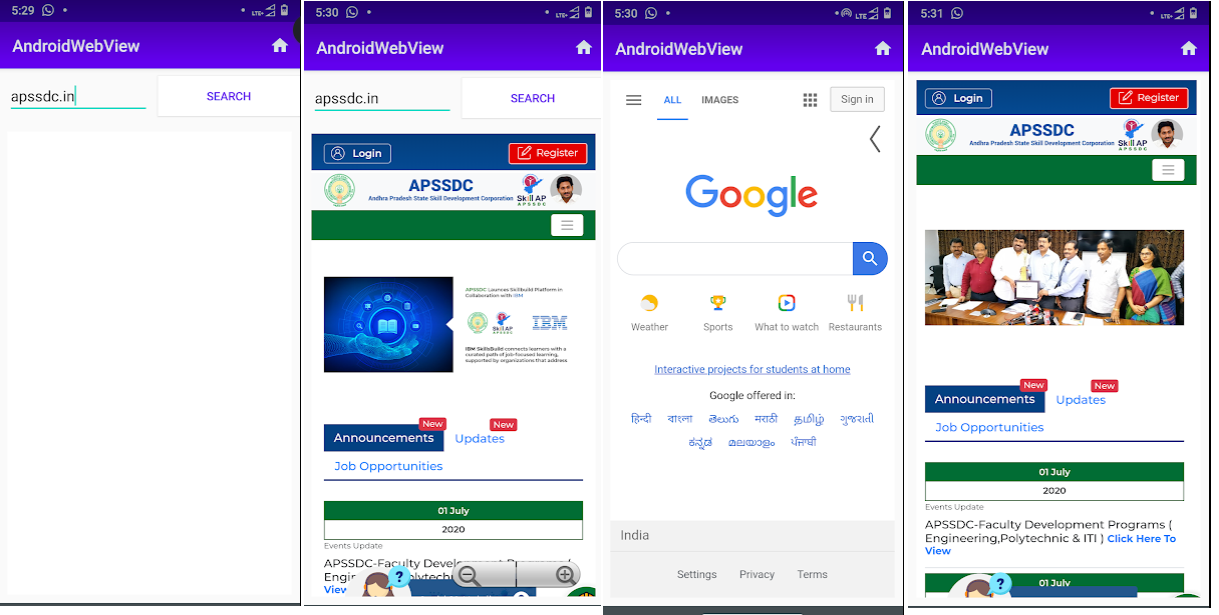
40.3. Steps to Create a simple app on Android WebView
Step 1:Enable the Internet Permissions
AndroidManifest.xml
<?xml version="1.0" encoding="utf-8"?>
<manifest xmlns:android="http://schemas.android.com/apk/res/android"
    package="com.muneiah.androidwebview">
    <!--Step 1-->
    <uses-permission android:name="android.permission.INTERNET" />
    <uses-permission android:name="android.permission.ACCESS_NETWORK_STATE" />

    <application
        android:allowBackup="true"
        android:icon="@mipmap/ic_launcher"
        android:label="@string/app_name"
        android:roundIcon="@mipmap/ic_launcher_round"
        android:supportsRtl="true"
        android:theme="@style/AppTheme">
        <activity
            android:name=".MainActivity"
            android:screenOrientation="portrait">
            <intent-filter>
                <action android:name="android.intent.action.MAIN" />

                <category android:name="android.intent.category.LAUNCHER" />
            </intent-filter>
        </activity>
    </application>

</manifest>
Step 2: At design file design the userinterface components EditText,Button,And WebView
activity_main.xml
<?xml version="1.0" encoding="utf-8"?>
<LinearLayout xmlns:android="http://schemas.android.com/apk/res/android"
    xmlns:app="http://schemas.android.com/apk/res-auto"
    xmlns:tools="http://schemas.android.com/tools"
    android:layout_width="match_parent"
    android:layout_height="match_parent"
    android:orientation="vertical"
    tools:context=".MainActivity">
    <!--Step 2-->
    <LinearLayout
        android:id="@+id/layout_liner"
        android:layout_width="match_parent"
        android:layout_height="wrap_content"
        android:orientation="horizontal"
        android:weightSum="2">

        <EditText
            android:id="@+id/et_input"
            android:layout_width="0dp"
            android:layout_height="wrap_content"
            android:layout_margin="10dp"
            android:layout_weight="1"
            android:hint="Enter the Url"
            android:inputType="textUri" />

        <Button
            android:layout_width="0dp"
            android:layout_height="wrap_content"
            android:layout_gravity="center"
            android:layout_weight="1"
            android:background="@android:color/white"
            android:onClick="showWebPage"
            android:text="Search"
            android:textColor="@color/colorPrimary" />
    </LinearLayout>

    <WebView
        android:id="@+id/webview"
        android:layout_width="match_parent"
        android:layout_height="match_parent"
        android:layout_margin="10dp"
        android:background="@android:color/white" />

</LinearLayout>
Step -3: Create new menu directory and new menu resourse file name as options_menu
options_menu.xml
<?xml version="1.0" encoding="utf-8"?>
<menu xmlns:android="http://schemas.android.com/apk/res/android"
    xmlns:app="http://schemas.android.com/apk/res-auto">
    <item
        android:id="@+id/action_Home"
        android:icon="@drawable/ic_home_black_24dp"
        android:orderInCategory="100"
        android:title="action_bookmark"
        app:showAsAction="always" />

</menu>

```package com.muneiah.androidwebview;

import androidx.annotation.NonNull;
import androidx.appcompat.app.AlertDialog;
import androidx.appcompat.app.AppCompatActivity;

import android.app.ProgressDialog;
import android.content.DialogInterface;
import android.os.Bundle;
import android.text.TextUtils;
import android.view.KeyEvent;
import android.view.Menu;
import android.view.MenuItem;
import android.view.View;
import android.webkit.WebSettings;
import android.webkit.WebView;
import android.webkit.WebViewClient;
import android.widget.EditText;
import android.widget.LinearLayout;
import android.widget.ProgressBar;
import android.widget.Toast;

public class MainActivity extends AppCompatActivity {
    WebView mWebView;
    EditText mEditText;
    ProgressDialog progressDialog;
    LinearLayout linearLayout;

    @Override
    protected void onCreate(Bundle savedInstanceState) {
        super.onCreate(savedInstanceState);
        setContentView(R.layout.activity_main);
        init();
    }

    //For inisilizing the all view ids form XML file
    private void init() {
        linearLayout = findViewById(R.id.layout_liner);
        mWebView = findViewById(R.id.webview);
        mEditText = findViewById(R.id.et_input);
        progressDialog = new ProgressDialog(this);

    }

    //For Button view click event handling
    public void showWebPage(View view) {
        progressDialog.show();
        String input = mEditText.getText().toString();
        //if null value enter displays message
        if (TextUtils.isEmpty(input)) {
            Toast.makeText(this, "please enter the url ", Toast.LENGTH_SHORT).show();
        } else {
            mWebView.setWebViewClient(new CustomWebViewClient());
            mWebView.loadUrl("https://www." + input);

            mWebView.getSettings().setJavaScriptEnabled(true);
            mWebView.getSettings().setCacheMode(WebSettings.LOAD_CACHE_ELSE_NETWORK);
            mWebView.getSettings().setBuiltInZoomControls(true);
            mWebView.setWebViewClient(new WebViewClient() {
                @Override
                public boolean shouldOverrideUrlLoading(WebView view, String url) {
                    view.loadUrl(url);
                    progressDialog.dismiss();
                    return true;
                }
            });
        }
    }

    public boolean onKeyDown(int keyCode, KeyEvent event) {
        if ((keyCode == KeyEvent.KEYCODE_BACK) && mWebView.canGoBack()) {
            mWebView.goBack();
            return true;
        } else if (keyCode == KeyEvent.KEYCODE_BACK) {
            ConfirmExit();
            return true;
        }
        return super.onKeyDown(keyCode, event);
    }

    //Adding some app close alert dialog
    public void ConfirmExit() {
        AlertDialog.Builder ad = new AlertDialog.Builder(MainActivity.this);
        ad.setTitle("Are you sure..!");
        ad.setMessage("Do you want close the Tab?");
        ad.setCancelable(false);
        ad.setPositiveButton("Ok", new DialogInterface.OnClickListener() {
            @Override
            public void onClick(DialogInterface dialog, int i) {
                MainActivity.this.finish();

            }
        });
        ad.setNegativeButton("No", new DialogInterface.OnClickListener() {
            @Override
            public void onClick(DialogInterface dialog, int i) {
                dialog.dismiss();
            }
        });
        ad.show();
    }

    //imlemnting option menu
    @Override
    public boolean onCreateOptionsMenu(Menu menu) {
        getMenuInflater().inflate(R.menu.options_menu, menu);
        return super.onCreateOptionsMenu(menu);
    }

    //option menu item click listeners implementing
    @Override
    public boolean onOptionsItemSelected(@NonNull MenuItem item) {
        switch (item.getItemId()) {
            case R.id.action_Home:
                linearLayout.setVisibility(View.GONE);
                WebSettings webSetting1 = mWebView.getSettings();
                webSetting1.setBuiltInZoomControls(true);
                webSetting1.setJavaScriptEnabled(true);
                mWebView.setWebViewClient(new WebViewClient());
                mWebView.loadUrl("https://www.google.com");
                break;

        }
        return super.onOptionsItemSelected(item);

    }
    private class CustomWebViewClient extends WebViewClient{
        @Override
        public boolean shouldOverrideUrlLoading(WebView view, String url) {
            view.loadUrl(url);
            return true;
        }
    }
}
Step 4:MainActivity.java
package com.muneiah.androidwebview;

import androidx.annotation.NonNull;
import androidx.appcompat.app.AlertDialog;
import androidx.appcompat.app.AppCompatActivity;

import android.app.ProgressDialog;
import android.content.DialogInterface;
import android.os.Bundle;
import android.text.TextUtils;
import android.view.KeyEvent;
import android.view.Menu;
import android.view.MenuItem;
import android.view.View;
import android.webkit.WebSettings;
import android.webkit.WebView;
import android.webkit.WebViewClient;
import android.widget.EditText;
import android.widget.LinearLayout;
import android.widget.ProgressBar;
import android.widget.Toast;

public class MainActivity extends AppCompatActivity {
    WebView mWebView;
    EditText mEditText;
    ProgressDialog progressDialog;
    LinearLayout linearLayout;

    @Override
    protected void onCreate(Bundle savedInstanceState) {
        super.onCreate(savedInstanceState);
        setContentView(R.layout.activity_main);
        init();
    }

    //For inisilizing the all view ids form XML file
    private void init() {
        linearLayout = findViewById(R.id.layout_liner);
        mWebView = findViewById(R.id.webview);
        mEditText = findViewById(R.id.et_input);
        progressDialog = new ProgressDialog(this);

    }

    //For Button view click event handling
    public void showWebPage(View view) {
        progressDialog.show();
        String input = mEditText.getText().toString();
        //if null value enter displays message
        if (TextUtils.isEmpty(input)) {
            Toast.makeText(this, "please enter the url ", Toast.LENGTH_SHORT).show();
        } else {
            mWebView.setWebViewClient(new CustomWebViewClient());
            mWebView.loadUrl("https://www." + input);

            mWebView.getSettings().setJavaScriptEnabled(true);
            mWebView.getSettings().setCacheMode(WebSettings.LOAD_CACHE_ELSE_NETWORK);
            mWebView.getSettings().setBuiltInZoomControls(true);
            mWebView.setWebViewClient(new WebViewClient() {
                @Override
                public boolean shouldOverrideUrlLoading(WebView view, String url) {
                    view.loadUrl(url);
                    progressDialog.dismiss();
                    return true;
                }
            });
        }
    }

    public boolean onKeyDown(int keyCode, KeyEvent event) {
        if ((keyCode == KeyEvent.KEYCODE_BACK) && mWebView.canGoBack()) {
            mWebView.goBack();
            return true;
        } else if (keyCode == KeyEvent.KEYCODE_BACK) {
            ConfirmExit();
            return true;
        }
        return super.onKeyDown(keyCode, event);
    }

    //Adding some app close alert dialog
    public void ConfirmExit() {
        AlertDialog.Builder ad = new AlertDialog.Builder(MainActivity.this);
        ad.setTitle("Are you sure..!");
        ad.setMessage("Do you want close the Tab?");
        ad.setCancelable(false);
        ad.setPositiveButton("Ok", new DialogInterface.OnClickListener() {
            @Override
            public void onClick(DialogInterface dialog, int i) {
                MainActivity.this.finish();

            }
        });
        ad.setNegativeButton("No", new DialogInterface.OnClickListener() {
            @Override
            public void onClick(DialogInterface dialog, int i) {
                dialog.dismiss();
            }
        });
        ad.show();
    }

    //imlemnting option menu
    @Override
    public boolean onCreateOptionsMenu(Menu menu) {
        getMenuInflater().inflate(R.menu.options_menu, menu);
        return super.onCreateOptionsMenu(menu);
    }

    //option menu item click listeners implementing
    @Override
    public boolean onOptionsItemSelected(@NonNull MenuItem item) {
        switch (item.getItemId()) {
            case R.id.action_Home:
                linearLayout.setVisibility(View.GONE);
                WebSettings webSetting1 = mWebView.getSettings();
                webSetting1.setBuiltInZoomControls(true);
                webSetting1.setJavaScriptEnabled(true);
                mWebView.setWebViewClient(new WebViewClient());
                mWebView.loadUrl("https://www.google.com");
                break;

        }
        return super.onOptionsItemSelected(item);

    }
    private class CustomWebViewClient extends WebViewClient{
        @Override
        public boolean shouldOverrideUrlLoading(WebView view, String url) {
            view.loadUrl(url);
            return true;
        }
    }
}