31. Firebase Google Sign-In Authentication
Firebase provides different types of Authentication methods. In our previous section, we learned how authentication is done using Firebase UI and Firebase SDK. In this section, we will learn another method, i.e., Google Sign-in Authentication. It is pretty easy to do.
Starting steps are the same as we have done with other authentication methods, which are as follows:
- Creating an Android project.
- Creating a Firebase project.
- Adding Firebase to the Android project or application, either manually or Firebase Assistance.
- Adding the required libraries and JSON files.
Step 1:
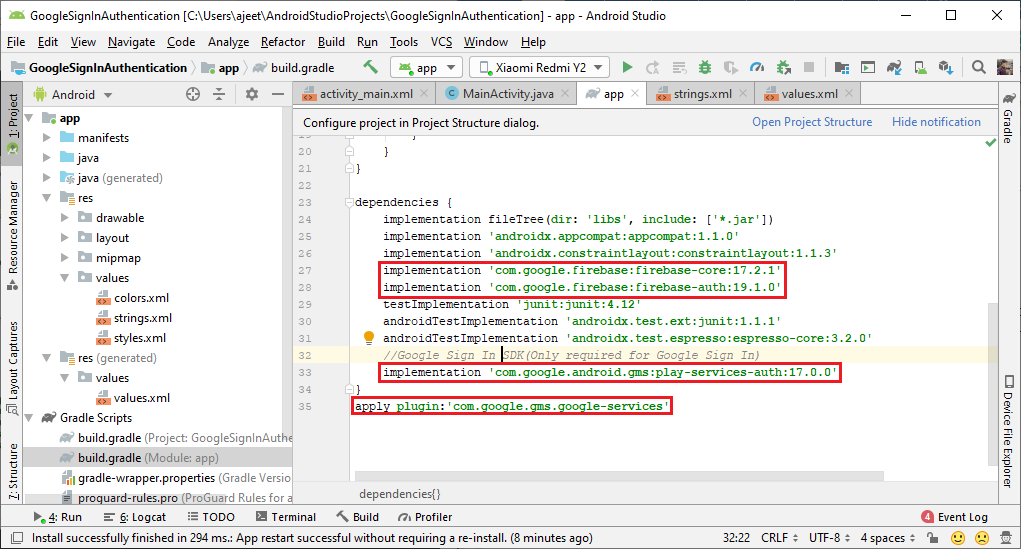
Apart from firebase auth and core libraries, we have to add google play services auth in app.gradle file
 s1
s1
Step 2:
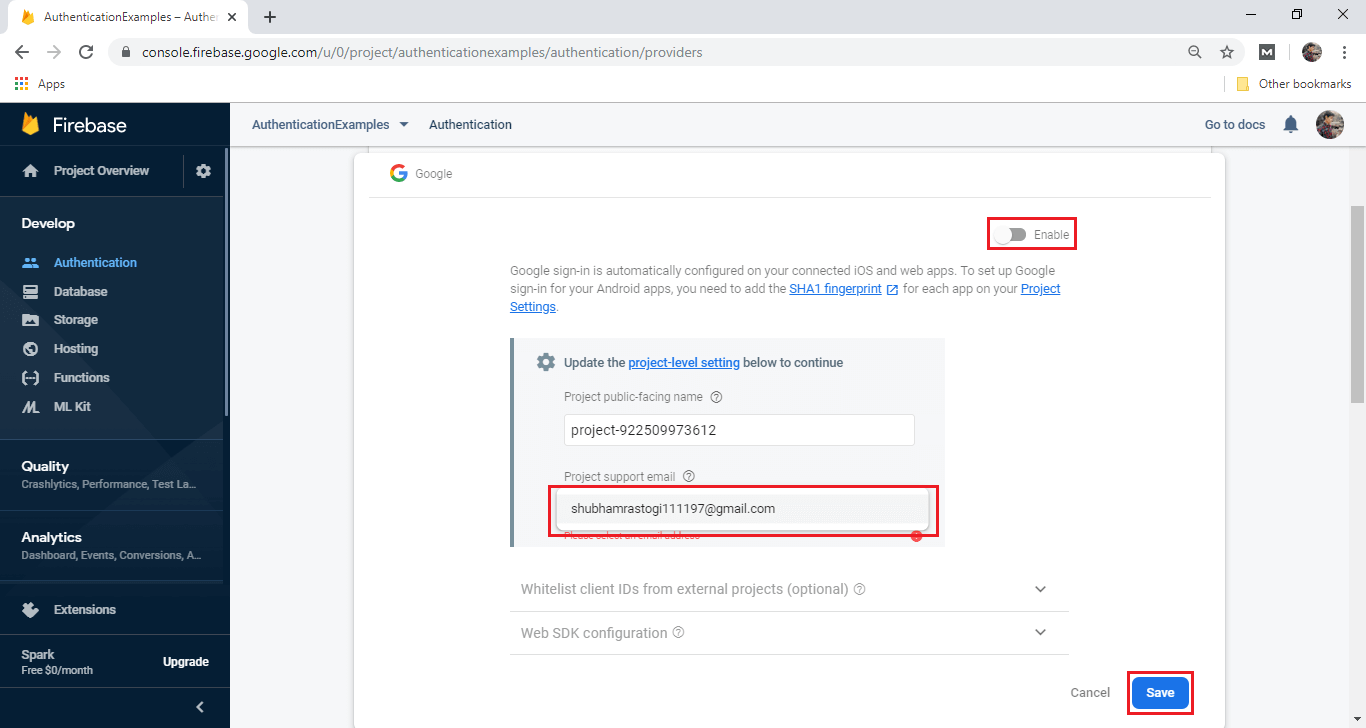
In the next step, we have to enable the Google sign-in method in Firebase console. We also have to add a project supporting email.
 s2
s2
Step 3:
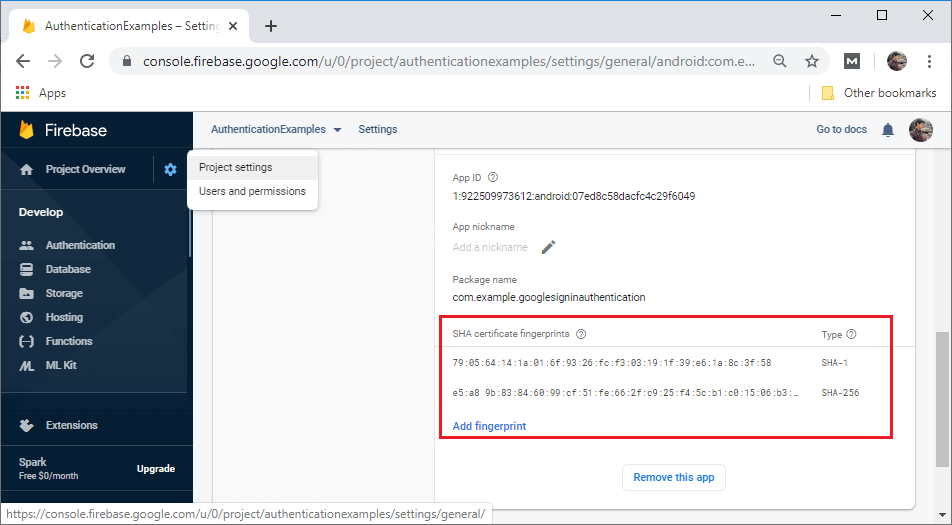
Just like our previous method, we have to set SHA-1 and SHA-256 keys.
 s3
s3
Step 4:
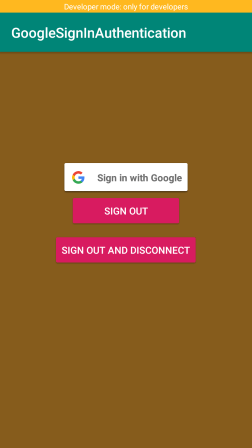
In the next step, we will create the layout file that contains three buttons Google sign-in, sign-out, and sign-out and disconnect. The activity layout will look like:
 s4
s4
Step 5:
Now, we will modify our MainActivity.java file to perform the Google sign-in authentication in the following way:
//Implement OnClickListener for sign-in button
public class MainActivity extends AppCompatActivity implements View.OnClickListener {

    //Adding tag for logging and RC_SIGN_IN for an activity result
private static final String TAG = "GoogleActivity";
private static final int RC_SIGN_IN = 9001;

    // Adding Google sign-in client
    GoogleSignInClient mGoogleSignInClient;

    //Creating member variable for FirebaseAuth
private FirebaseAuth mAuth;

    @Override
protected void onCreate(Bundle savedInstanceState) {
super.onCreate(savedInstanceState);
        setContentView(R.layout.activity_main);

        //Adding buttons to the OnClickListener
        findViewById(R.id.sign_in_button).setOnClickListener(this);
        findViewById(R.id.signOutButton).setOnClickListener(this);
        findViewById(R.id.disconnectButton).setOnClickListener(this);

        //Building Google sign-in and sign-up option.
// Configuring Google Sign In
GoogleSignInOptions gso = new GoogleSignInOptions.Builder(GoogleSignInOptions.DEFAULT_SIGN_IN)
// for the requestIdToken, use getString(R.string.default_web_client_id), this is in the values.xml file that
                // is generated from your google-services.json file (data from your firebase project), uses the google-sign-in method
                // web api key
.requestIdToken(getString(R.string.default_web_client_id))//Default_web_client_id will be matched with the
                .requestEmail()
                .build();

// Build a GoogleSignInClient with the options specified by gso.
mGoogleSignInClient = GoogleSignIn.getClient(this, gso);

// Set the dimensions of the sign-in button.
SignInButton signInButton = findViewById(R.id.sign_in_button);
        signInButton.setSize(SignInButton.SIZE_WIDE);

// Initialize Firebase Auth
mAuth = FirebaseAuth.getInstance();
    }
     //Creating onStart() method.
    @Override
public void onStart() {
super.onStart();

// Checking if the user is signed in (non-null) and update UI accordingly.
FirebaseUser currentUser = mAuth.getCurrentUser();

if (currentUser != null) {
            Log.d(TAG, "Currently Signed in: " + currentUser.getEmail());
            Toast.makeText(MainActivity.this, "Currently Logged in: " + currentUser.getEmail(), Toast.LENGTH_LONG).show();
        }
    }
     //Calling onActivityResult to use the information about the sign-in user contains in the object.
    @Override
public void onActivityResult(int requestCode, int resultCode, Intent data) {
super.onActivityResult(requestCode, resultCode, data);

// Result returned from launching the Intent from GoogleSignInApi.getSignInIntent(...);
if (requestCode == RC_SIGN_IN) {
            Task<GoogleSignInAccount> task = GoogleSignIn.getSignedInAccountFromIntent(data);
try {
// Google Sign In was successful, authenticate with Firebase
GoogleSignInAccount account = task.getResult(ApiException.class);
                Toast.makeText(this, "Google Sign in Succeeded",  Toast.LENGTH_LONG).show();
                firebaseAuthWithGoogle(account);
            } catch (ApiException e) {
// Google Sign In failed, update UI appropriately
Log.w(TAG, "Google sign in failed", e);
                Toast.makeText(this, "Google Sign in Failed " + e,  Toast.LENGTH_LONG).show();
            }
        }
    }
    //Creating helper method FirebaseAuthWithGoogle().
private void firebaseAuthWithGoogle(GoogleSignInAccount acct) {
        Log.d(TAG, "firebaseAuthWithGoogle:" + acct.getId());
        //Calling get credential from the oogleAuthProviderG
        AuthCredential credential = GoogleAuthProvider.getCredential(acct.getIdToken(), null);
mAuth.signInWithCredential(credential)
                .addOnCompleteListener(this, new OnCompleteListener<AuthResult>() {
//Override th onComplete() to see we are successful or not.
 @Override
public void onComplete(@NonNull Task<AuthResult> task) {
if (task.isSuccessful()) {
// Update UI with the sign-in user's information
FirebaseUser user = mAuth.getCurrentUser();
                            Log.d(TAG, "signInWithCredential:success: currentUser: " + user.getEmail());
                            Toast.makeText(MainActivity.this, "Firebase Authentication Succeeded ",  Toast.LENGTH_LONG).show();
                        } else {
// If sign-in fails to display a message to the user.
Log.w(TAG, "signInWithCredential:failure", task.getException());
                            Toast.makeText(MainActivity.this, "Firebase Authentication failed:" + task.getException(),  Toast.LENGTH_LONG).show();
                        }
                    }
                });
    }

public void signInToGoogle(){
        //Calling Intent and call startActivityForResult() method
        Intent signInIntent = mGoogleSignInClient.getSignInIntent();
        startActivityForResult(signInIntent, RC_SIGN_IN);
    }

private void signOut() {
// Firebase sign out
FirebaseAuth.getInstance().signOut();

// Google sign out
mGoogleSignInClient.signOut().addOnCompleteListener(this,
new OnCompleteListener<Void>() {
                    @Override
public void onComplete(@NonNull Task<Void> task) {
// Google Sign In failed, update UI appropriately
Toast.makeText(getApplicationContext(),"Signed out of google",Toast.LENGTH_SHORT).show();
                    }
                });
    }

private void revokeAccess() {
// Firebase sign out
FirebaseAuth.getInstance().signOut();

// Google revoke access
mGoogleSignInClient.revokeAccess().addOnCompleteListener(this,
new OnCompleteListener<Void>() {
                    @Override
public void onComplete(@NonNull Task<Void> task) {
// Google Sign In failed, update UI appropriately
Log.w(TAG, "Revoked Access");
                    }
                });
    }

    @Override
public void onClick(View v) {
int i = v.getId();
if (i == R.id.sign_in_button) {
Adding signInToGoogle() method
 signInToGoogle();
        }
else if (i == R.id.signOutButton) {
            signOut();
        }
else if (i == R.id.disconnectButton) {
            revokeAccess();
        }
    }

    @Override
public void onPointerCaptureChanged(boolean hasCapture) {

    }
}
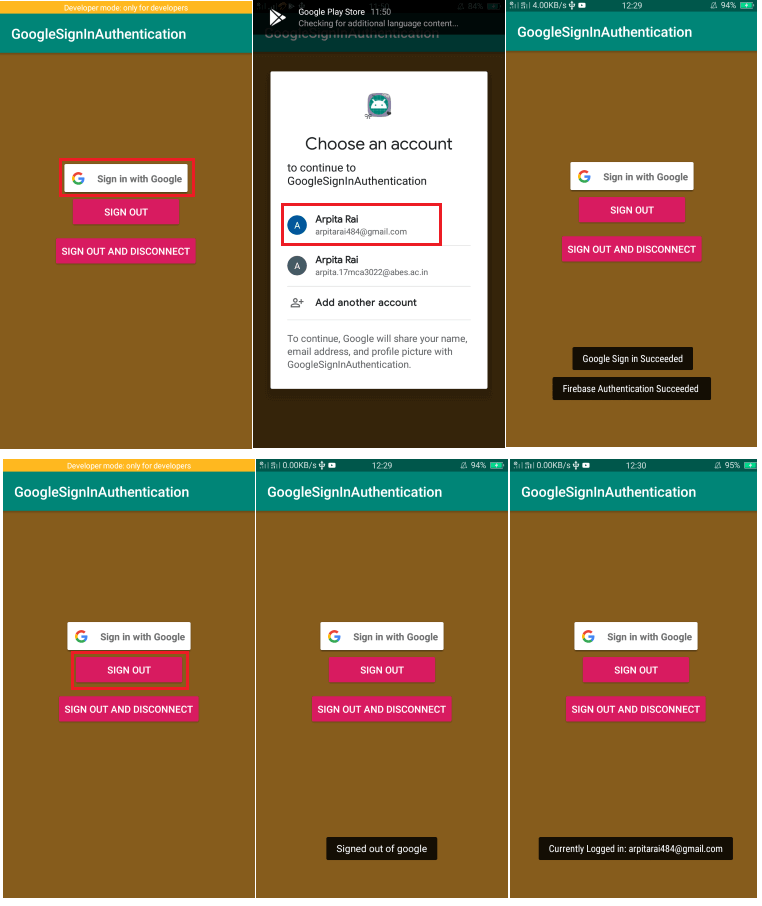 s5
s5
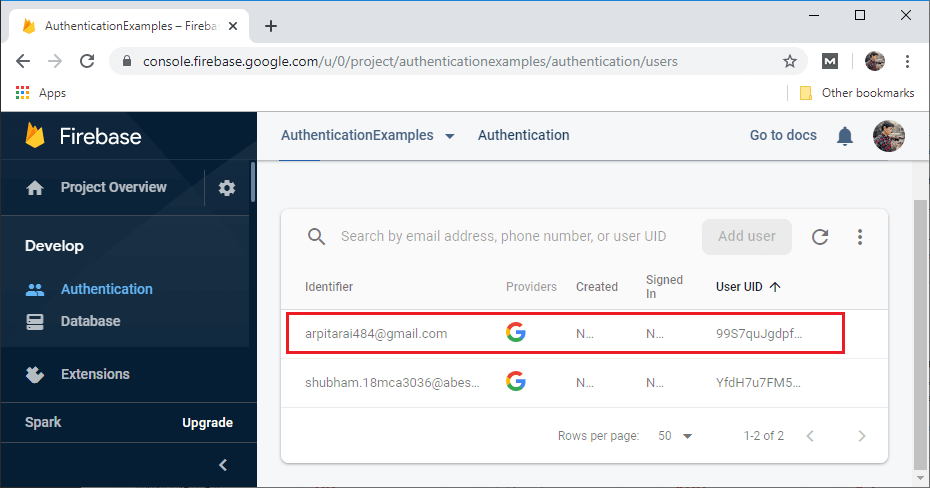 s6
s6
Download Code:
https://github.com/AP-Skill-Development-Corporation/AdvancedAndroid/tree/master/GoogleSignInAuthentication