11. User Interface Components
The Android application having an excellent UI will have a large number of users because usually, people get attracted towards the look and feel of the application. So, to make the UI of the application good, we need to learn about XML(Extensible Markup Language) and View components in Android.
So, in this , we will learn about User Interface(UI) in Android. Here, we going to design a screen and understand what the different types of View Components Android Studio provided to us. So, let’s start with View.
11.1. View
- The view is the component which Android provides us to design the layouts of the app. So, we can understand view as a rectangular area which is going to contain some element inside it.
- A View is a superclass for all the UI components. You can also check out the official documentation of View, here.
What are these UI components that we can use in our application? Let’s make a small list of some of the view components:
- TextView: To add some text in your application.
- EditText: This is used when you want to take some input from the users.
- ImageView: To add some image in the application.
- ProgressBar: To show the progress to something. For example, the loading screen.
- Button: Buttons are used to trigger some action on the click of the button. It can be starting a new activity or something else.
- ImageButton: It is used to make a clickable image.
- CheckBox: CheckBox is used to select some options out of many available options.
- DatePicker: To select some particular date.
- SeekBar for sliding left or right to a setting
- RadioGroup of RadioButton elements for selecting one option
- RatingBar can be used to get the rating from the user.
- Switch for turning on or turning off an option
- Spinner drop-down menu for selecting one option
These are some of the UI components that are available for our use.
11.1.1. A group of view is known as ViewGroup. The Top-level ViewGroup is a parent, and under it, all the view and other view groups are its children.
For example, under a LinearLayout, you can add two Buttons and one EditText. Here, LinearLayout is the parent view and the Buttons and EditTexts are the children.
11.1.2. Create User Interface
- You can edit the layout file that is available to you like activity_main.xml or you can create one layout file by going app > res > layout > right-click > New > Layout resource file and then enter the file name and click on OK.
- You can find your existing XML files in app > res > layout > your_xml_files.
11.2. A Small Example here taking two components :
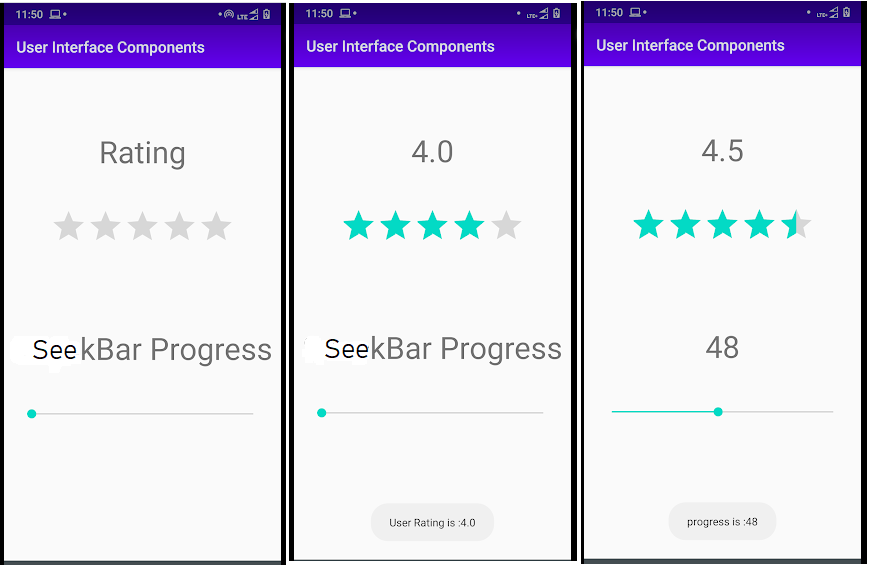
activity_main.xml
<?xml version="1.0" encoding="utf-8"?>
<androidx.constraintlayout.widget.ConstraintLayout xmlns:android="http://schemas.android.com/apk/res/android"
    xmlns:app="http://schemas.android.com/apk/res-auto"
    xmlns:tools="http://schemas.android.com/tools"
    android:layout_width="match_parent"
    android:layout_height="match_parent"
    tools:context=".MainActivity">

    <SeekBar
        android:id="@+id/seekBar"
        android:layout_width="match_parent"
        android:layout_height="wrap_content"
        android:layout_margin="20dp"
        app:layout_constraintBottom_toBottomOf="parent"
        app:layout_constraintEnd_toEndOf="parent"
        app:layout_constraintHorizontal_bias="0.0"
        app:layout_constraintStart_toStartOf="parent"
        app:layout_constraintTop_toBottomOf="@+id/ratingBar2" />

    <RatingBar
        android:id="@+id/ratingBar2"
        android:layout_width="wrap_content"
        android:layout_height="wrap_content"
        android:layout_marginStart="85dp"
        android:layout_marginLeft="85dp"
        android:layout_margin="20dp"
        android:layout_marginEnd="86dp"
        android:layout_marginRight="86dp"
        app:layout_constraintBottom_toTopOf="@+id/seekBar"
        app:layout_constraintEnd_toEndOf="parent"
        app:layout_constraintStart_toStartOf="parent"
        app:layout_constraintTop_toTopOf="parent" />

    <TextView
        android:id="@+id/tv_rating"
        android:layout_width="wrap_content"
        android:layout_height="wrap_content"
        android:layout_marginTop="117dp"
        android:layout_marginBottom="83dp"
        android:text="Rating"
        android:textSize="40sp"
        app:layout_constraintBottom_toTopOf="@+id/ratingBar2"
        app:layout_constraintEnd_toEndOf="parent"
        app:layout_constraintStart_toStartOf="parent"
        app:layout_constraintTop_toTopOf="parent" />

    <TextView
        android:id="@+id/tv_seek"
        android:layout_width="wrap_content"
        android:layout_height="wrap_content"
        android:layout_marginTop="124dp"
        android:layout_marginBottom="76dp"
        android:textSize="40sp"
        android:text="SeeckBar Progress"
        app:layout_constraintBottom_toTopOf="@+id/seekBar"
        app:layout_constraintEnd_toEndOf="parent"
        app:layout_constraintStart_toStartOf="parent"
        app:layout_constraintTop_toBottomOf="@+id/ratingBar2" />

</androidx.constraintlayout.widget.ConstraintLayout>
MainActivity.java
package com.muneiah.userinterfacecomponents;

import androidx.appcompat.app.AppCompatActivity;

import android.os.Bundle;
import android.widget.RatingBar;
import android.widget.SeekBar;
import android.widget.TextView;
import android.widget.Toast;

public class MainActivity extends AppCompatActivity {
RatingBar mRatingBar;
SeekBar seekBar;
TextView rating_outcome,progress_outcome;
    @Override
    protected void onCreate(Bundle savedInstanceState) {
        super.onCreate(savedInstanceState);
        setContentView(R.layout.activity_main);
        init();
        //when rating bar clicks
        mRatingBar.setOnRatingBarChangeListener(new RatingBar.OnRatingBarChangeListener() {
            @Override
            public void onRatingChanged(RatingBar ratingBar, float rating, boolean fromUser) {
                String rate=String.valueOf(ratingBar.getRating());
                rating_outcome.setText(rate);
                Toast.makeText(MainActivity.this, "User Rating is :"+rate, Toast.LENGTH_SHORT).show();
            }
        });

                //when Seek bar clicks
        seekBar.setOnSeekBarChangeListener(new SeekBar.OnSeekBarChangeListener() {
            @Override
            public void onProgressChanged(SeekBar seekBarObj, int progress, boolean fromUser) {
                String seekProgress=String.valueOf(seekBarObj.getProgress());
                progress_outcome.setText(seekProgress);
                Toast.makeText(MainActivity.this, "progress is :"+seekProgress, Toast.LENGTH_SHORT).show();
            }

            @Override
            public void onStartTrackingTouch(SeekBar seekBar) {

            }

            @Override
            public void onStopTrackingTouch(SeekBar seekBar) {

            }
        });
    }
    public void init(){
        mRatingBar=findViewById(R.id.ratingBar2);
        seekBar=findViewById(R.id.seekBar);
        rating_outcome=findViewById(R.id.tv_rating);
        progress_outcome=findViewById(R.id.tv_seek);
    }
}