41. Android Services
41.1. What are Android Services?
- Service is basically a process. Android service is a component that runs in the background in order to perform long-running operations without interacting with the user and it works even if the application is destroyed. Another application component can start a service and it continues to run in the background even if you switch to another application.
- Additionally, a component can bind itself to a service in order to interact with it and also perform interprocess communication.
- Note: The android.app.Service is a subclass of ContextWrapper class and Android service is not a thread or separate process.
41.2. Android- Services Life cycle
Android Services life cycle can have two forms of services. The lifecycle of a service follows two different paths, namely:
- Started
- Bound
Started A service is started when an application component calls startService() method. Once started, a service can run in the background indefinitely, even if the component which is responsible for the start is destroyed. It is stopped by using the stopService() method. The service can also stop itself by calling the stopSelf() method.
Bound A service is bound when an application component binds to it by calling bindService(). Bound service offers a client-server interface that allows components to interact with the service, send requests and, get results. It processes across inter-process communication (IPC). The client can unbind the service by calling the unbindService() method.
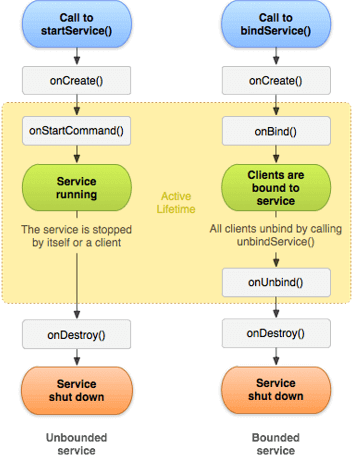
let’s discuss the different methods under the service class.
There are a few methods using which you can easily perform operations on any application. Some of them are:
Method | Description —|— onStartCommand() | This method is called when any other component, like say an activity, requests the service to be started, by calling startService().It is your responsibility to stop the service when the corresponding work is done by using stopSelf() or stopService() methods. onBind() | Calls this method when another component wants to bind with the service by calling bindService().To implement this, you must provide an interface that clients use in order to communicate with the service. It returns an IBinder object. If you don’t want to allow binding, then return null. onUnbind() | The system calls this method when all clients are disconnected from a particular interface published by the service. onRebind() | Calls this method when new clients are connected to the service after it had previously been notified that all are disconnected in onUnbind(Intent). onCreate() | The system calls this method when the service is created first using onStartCommand() or onBind(). It is required to perform a one-time set-up. onDestroy() | This method is called when the service is no longer used and is being destroyed. Your service should implement this in order to clean up any resources such as threads, registered listeners, receivers, etc.
Implementation and declaration
- A service needs to be declared in the AndroidManifest.xml file and the implementing class must extend the Service class or one of its subclasses.
- For Create service goto>Java Direcory>Right on First package >new >service> then give the class name.
The following code shows an example for a service declaration and its implementation.
    <service
            android:name=".MyService"
            android:enabled="true"
            android:exported="true">
</service>
Defaulty Service class follows below
package com.muneiah.servicesexample;

import android.app.Service;
import android.content.Intent;
import android.os.IBinder;

public class MyService extends Service {

    public MyService() {
    }


    @Override
    public IBinder onBind(Intent intent) {
        // TODO: Return the communication channel to the service.
        throw new UnsupportedOperationException("Not yet implemented");
    }
}
41.3. A Simple application implementing an Android Service
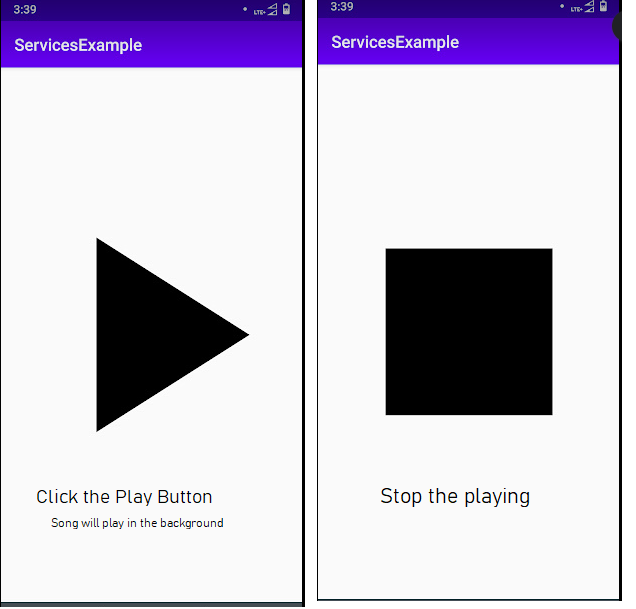
- For Adding the Song create new resources directory(app\res(right click new )\Androd Resource Directory\raw
- Next new add audio file(mp3) in the res\raw folder
acivity_main.xml
<?xml version="1.0" encoding="utf-8"?>
<androidx.constraintlayout.widget.ConstraintLayout xmlns:android="http://schemas.android.com/apk/res/android"
    xmlns:app="http://schemas.android.com/apk/res-auto"
    xmlns:tools="http://schemas.android.com/tools"
    android:layout_width="match_parent"
    android:layout_height="match_parent"
    tools:context=".MainActivity">

    <ImageView
        android:layout_width="400dp"
        android:layout_height="400dp"
        android:id="@+id/img"
        android:src="@drawable/ic_play_arrow_black_24dp"
        app:layout_constraintBottom_toBottomOf="parent"
        app:layout_constraintLeft_toLeftOf="parent"
        app:layout_constraintRight_toRightOf="parent"
        app:layout_constraintTop_toTopOf="parent" />

</androidx.constraintlayout.widget.ConstraintLayout>
MyService.java
package com.muneiah.servicesexample;

import android.app.Service;
import android.content.Intent;
import android.media.MediaPlayer;
import android.os.IBinder;

public class MyService extends Service {
    MediaPlayer mp;
    public MyService() {
    }

    @Override
    public void onCreate() {
        super.onCreate();
        mp=MediaPlayer.create(getApplicationContext(),R.raw.mysong);
    }

    @Override
    public int onStartCommand(Intent intent, int flags, int startId) {
        mp.start();
        return super.onStartCommand(intent, flags, startId);
    }

    @Override
    public void onDestroy() {
        super.onDestroy();
        mp.stop();
    }

    @Override
    public IBinder onBind(Intent intent) {
        // TODO: Return the communication channel to the service.
        throw new UnsupportedOperationException("Not yet implemented");
    }
}
MainActivity.java
package com.muneiah.servicesexample;

import androidx.appcompat.app.AppCompatActivity;

import android.content.Intent;
import android.os.Bundle;
import android.view.View;
import android.widget.ImageView;

public class MainActivity extends AppCompatActivity {
    ImageView iv;
    int c=0;
    @Override
    protected void onCreate(Bundle savedInstanceState) {
        super.onCreate(savedInstanceState);
        setContentView(R.layout.activity_main);
        iv=findViewById(R.id.img);
        iv.setOnClickListener(new View.OnClickListener() {
            @Override
            public void onClick(View v) {
                if (c==0) {
                    Intent i = new Intent(MainActivity.this, MyService.class);
                    startService(i);
                    c++;
                    iv.setImageResource(R.drawable.ic_stop_black_24dp);
                }else {
                    iv.setImageResource(R.drawable.ic_play_arrow_black_24dp);
                    Intent i = new Intent(MainActivity.this, MyService.class);
                    stopService(i);
                    c--;
                }
            }
        });
    }
}
ManiFestFile.xml
<?xml version="1.0" encoding="utf-8"?>
<manifest xmlns:android="http://schemas.android.com/apk/res/android"
    package="com.muneiah.servicesexample">

    <application
        android:allowBackup="true"
        android:icon="@mipmap/ic_launcher"
        android:label="@string/app_name"
        android:roundIcon="@mipmap/ic_launcher_muni_round"
        android:supportsRtl="true"
        android:theme="@style/AppTheme">
        <service
            android:name=".MyService"
            android:enabled="true"
            android:exported="true"></service>

        <activity android:name=".MainActivity">
            <intent-filter>
                <action android:name="android.intent.action.MAIN" />

                <category android:name="android.intent.category.LAUNCHER" />
            </intent-filter>
        </activity>
    </application>

</manifest>
ic_play_arrow_black_24dp.xml
<vector xmlns:android="http://schemas.android.com/apk/res/android"
        android:width="24dp"
        android:height="24dp"
        android:viewportWidth="24.0"
        android:viewportHeight="24.0">
    <path
        android:fillColor="#FF000000"
        android:pathData="M8,5v14l11,-7z"/>
</vector>
ic_stop_black_24dp.xml
<vector xmlns:android="http://schemas.android.com/apk/res/android"
        android:width="24dp"
        android:height="24dp"
        android:viewportWidth="24.0"
        android:viewportHeight="24.0">
    <path
        android:fillColor="#FF000000"
        android:pathData="M6,6h12v12H6z"/>
</vector>